Job Application Automation Software: How to Choose a Smarter Job Search System
What if automation could clear repetitive work without turning your job search into a batch of generic applications? The right job application automation software can reuse your details, help complete application forms, and keep submissions organized. But speed only helps when you stay in control of what each employer receives.
If you’ve re-entered the same work history, rewritten your CV for another role, and then lost track of where you applied, the frustration makes sense. Those tasks take time away from choosing suitable opportunities, presenting your experience clearly, and preparing for interviews. Automation should handle repeatable steps, not decide how to describe your experience or send claims you can’t support.
This guide explains which parts of a job search can be automated responsibly and how to compare tools by workflow coverage, review controls, and document quality. You’ll learn what to check before software fills or submits a form, how to keep applications focused, and where role discovery, tailored CVs and cover letters, hiring-team outreach, and interview preparation fit into the process. The goal is less busywork, more relevant applications, and control that stays with you.
Key takeaways
- Identify which repetitive job-search tasks you want to streamline, then separate automation from the work of making each application relevant.
- Choose job application automation software by how well it connects role discovery, form completion, tailored documents, and application tracking.
- Use automation to reduce repeated data entry, but review role-specific details before an application is submitted.
- Evaluate a tool’s workflow coverage and review controls, and understand its information access, retention, and deletion policies.
- Look beyond submission: hiring-team outreach and interview preparation can connect application tasks into a more complete search workflow.
What Is Job Application Automation Software, and Which Tasks Can It Handle?
Job application automation software automates or assists with repetitive steps in finding and applying for roles. Depending on the tool, it may match openings to your criteria, transfer saved details into application forms, create tailored documents, or help organize submissions. Some tools focus on one task; others connect several stages of the search.
Automation handles activity, but it doesn’t automatically improve relevance. A fast application can still miss a role’s requirements or contain inaccurate details. The aim is to reduce repeated effort while keeping your experience truthful, your materials specific, and your search organized. Employers may use an Applicant Tracking System (ATS) to manage applications, but candidate-facing software doesn’t control how employers review or assess them. No tool can guarantee an interview, offer, or hiring outcome.
Which parts of a job application can software automate?
Capabilities vary, so assess the workflow rather than relying on the “automation” label. Common tasks include:
- Job discovery: Finding openings that match criteria you set, such as role, location, or skills.
- Forms: Reusing candidate details to fill fields and, in some workflows, submit applications. Employer portals differ, so some forms may still need manual input or review.
- Application support: Tailoring a CV and cover letter, drafting hiring-team outreach messages, tracking roles, or preparing for interviews.
These are separate capabilities. A tool that finds roles may not complete forms, and a form-filling tool may not tailor documents or help with follow-up.
Automation, autofill, and AI writing: what is the difference?
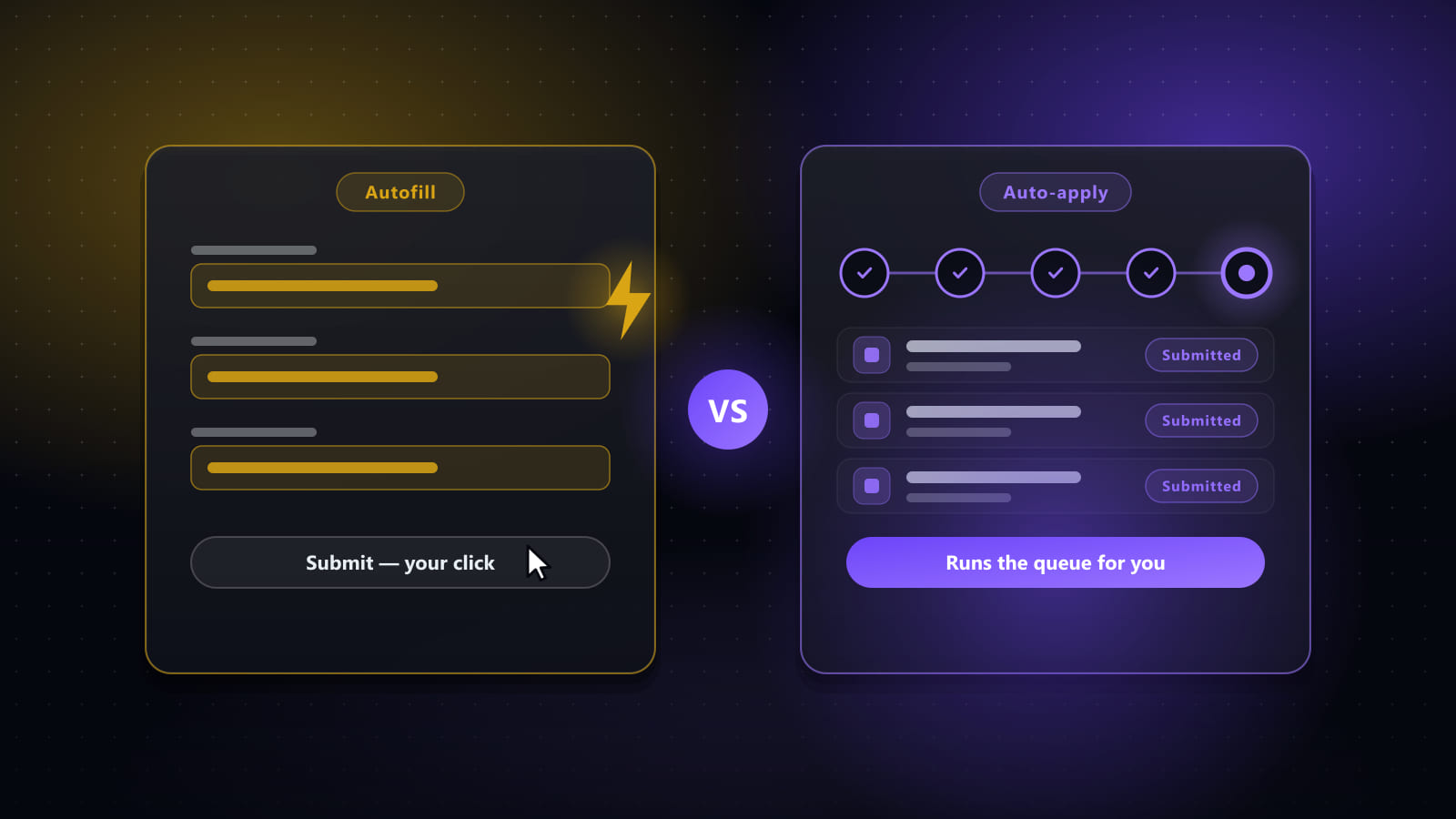
Autofill transfers stored information, such as contact details or work history, into form fields. It reduces repetitive typing, but may not interpret a question correctly or adapt an answer to a particular role.
AI assistance can draft or adapt content using job and candidate information. Review every claim for accuracy and relevance before using it. An end-to-end service connects multiple steps, such as finding relevant openings, completing forms, preparing role-specific documents, and supporting outreach or interview preparation. It’s a broader workflow, not simply a faster way to fill one field.
The distinction matters: reducing data entry is useful, but a connected process can also help keep applications focused from role selection through follow-up. Keep your own review in the loop wherever software handles personal details or communicates in your name.
How Job Application Automation Software Connects the Search-to-Interview Workflow
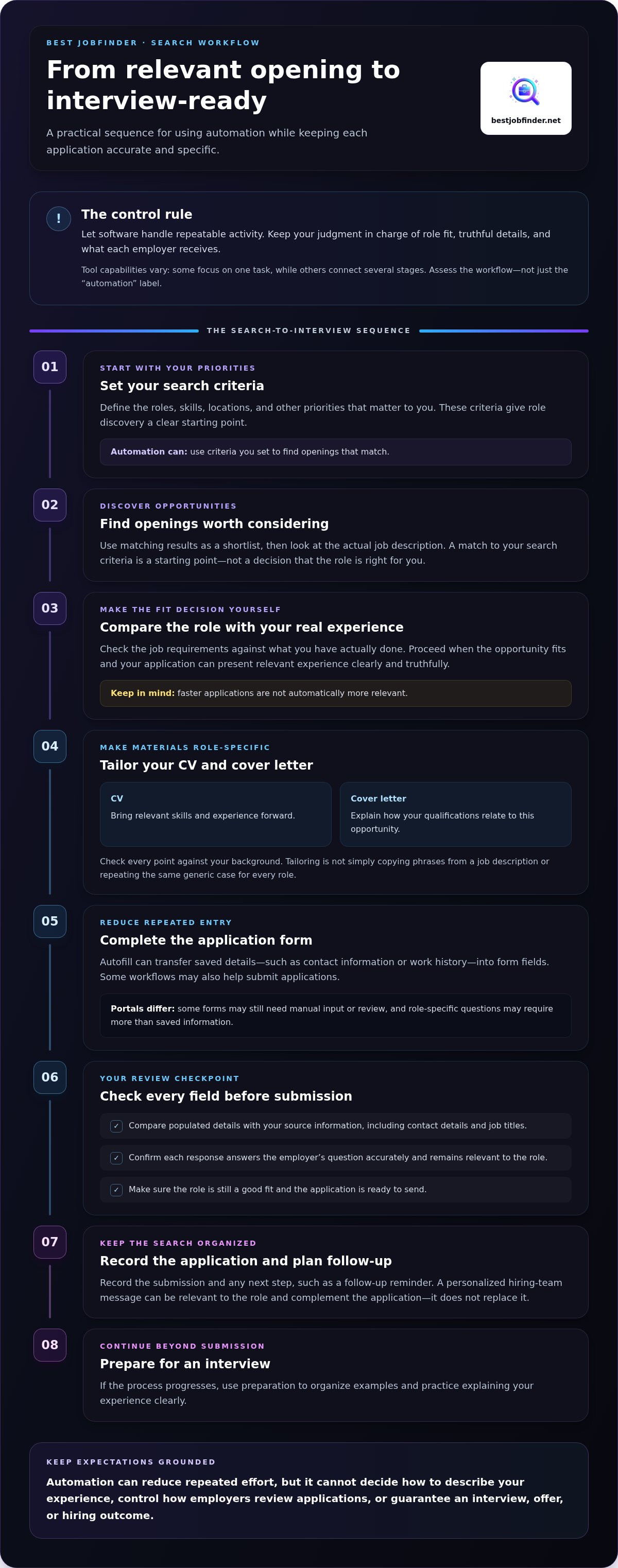
A job search works better as a sequence than as a pile of disconnected tasks. Start by setting your criteria: the roles, skills, locations, and other priorities that matter to you. Use them to find openings worth considering, then compare each job description with your actual experience before proceeding.
An effective automation workflow connects repeatable tasks with review checkpoints, so each application moves forward accurately and on purpose. That principle applies whether you use separate tools or a connected service. Job application automation software can reuse candidate information to reduce repeated entry, but saved details still need checking. An outdated contact detail, inaccurate job title, or answer carried over to the wrong question can undermine an otherwise relevant application.
From relevant openings to completed application forms
Once a role fits your criteria, automation can help complete its application form using information you’ve already provided. Before submission, compare the populated fields with your source details and the employer’s questions. Portals differ: one may ask for a straightforward work history, while another may request role-specific responses or additional information. Treat automation as assistance, not proof that every field is correct or every step is complete.
Before submitting, confirm that the role remains a good fit, each response answers the question asked, and the application is ready to send. Then record the submission and any next step, such as a follow-up reminder. That handoff helps keep the search organized instead of leaving another application lost in a browser tab.
From tailored documents to hiring-team outreach
Application documents should connect the employer’s needs to qualifications you can genuinely support. A tailored CV can bring relevant skills and experience forward; a cover letter can explain how they relate to this opportunity. Tailoring isn’t copying phrases from a job description. Check that each point reflects your background and that the document speaks to the role rather than repeating the same generic case everywhere.
After applying, a personalized message to the hiring team can be a separate follow-up step. It should be relevant to the role and complement the application, not replace it. If the process progresses, interview preparation can help you organize examples and practice explaining your experience clearly. These steps extend the workflow beyond submission without promising a response or hiring outcome.
For job seekers who want those stages connected, Best JobFinder’s job search assistance brings role discovery, application forms, tailored CVs and cover letters, outreach, and interview preparation into one process.
Automation Versus Manual Applications: Does Faster Applying Mean Better Results?
Faster applications aren’t automatically stronger applications. A tool can reduce repetitive work, but speed can also multiply mistakes or send generic materials if you skip checking role fit. Compare the workflow, not just how many applications a tool says it can process.
| Approach | Time and repeat entry | Tailoring and review | Workflow coverage |
|---|---|---|---|
| Manual applications | More time spent entering the same details and managing each step. | Direct control over tailoring and submission. | Depends on your own process and tools. |
| Basic autofill | Reduces repeated typing in supported form fields. | Usually requires you to adapt documents and verify answers. | Primarily form entry, with other tasks managed separately. |
| Connected application automation | Can link several repeatable steps and reduce switching between tools. | May assist with tailored content, but you still need to review fit and accuracy. | Can span role discovery, forms, documents, outreach, and preparation. |
Automation improves efficiency only when your information and the role fit remain accurate. More submissions don’t make up for incomplete forms, unsupported claims, or a CV that doesn’t speak to the opening.
Where automation saves effort, and where it needs your judgment
Automate repeatable details such as contact information, work dates, and routine administrative fields. Keep your judgment in the loop when deciding whether a role fits, describing your experience truthfully, and approving the final application. Before submission, compare each key claim in your materials with your background and the job’s requirements.
Volume is no substitute for relevance. A smaller set of complete, well-matched applications can represent you more clearly than a larger batch sent with little review.
How to compare workflow coverage without chasing feature counts
Assess job application automation software against the bottleneck you actually face. If finding suitable roles takes most of your time, role discovery matters. If repeated forms slow you down, check how form completion works and where you can review it. If tailoring and follow-up get neglected, look for support with role-specific documents, outreach, or interview preparation.
Connected workflows can reduce copying details between separate tools and help keep applications organized. But a long feature list isn’t automatically a better fit. Map your current process, identify the handoffs that create friction, and prioritize capabilities that address those gaps while leaving clear points for your review.
How to Evaluate Job Application Automation Software Safely and Set It Up
Don’t hand over your whole job search at once. Test a tool against the tasks that currently drain your time, then expand only if its results are accurate and its controls suit your needs. Use this sequence:
- Define your bottleneck. Identify whether role discovery, form entry, document tailoring, or tracking creates the most friction.
- Inspect workflow coverage. See which steps connect and where you’ll need to move information manually.
- Test the output. Use a representative opening to check role matches, form fields, and tailored materials.
- Review controls. Confirm you can inspect and edit information before an application is submitted.
What to test before relying on an automated workflow
Choose a real role that reflects your search criteria. Do suggested openings match the skills and priorities you entered? If the tool drafts a CV or cover letter, compare it with the job description and your work history. It should emphasize relevant, accurate qualifications, not invent skills or inflate your experience.
Check completed forms for missing fields, outdated details, and answers that don’t fit the employer’s question. Make sure you have a meaningful chance to review the full application before submission. If the workflow hides or skips that checkpoint, don’t treat its output as ready to send.
How to protect your information while automating applications
Job-search tools may handle sensitive personal and work-history details. Before adding information, read the privacy policy and look for clear explanations of what the service collects, how it uses the data, who can access it, how long it keeps it, and how you can request deletion. Don’t assume those practices are the same across tools.
Use a unique password and secure account practices where supported. For broader advice, see our guide to protecting privacy while searching for work.
Once you’ve tested accuracy, reviewed controls, and understood the data-handling terms, choose a setup that removes busywork without removing your oversight. Explore job search and application assistance that connects role discovery, form completion, tailored documents, hiring-team outreach, and interview preparation.
How Best JobFinder Helps Make Job Application Automation More Complete
A form-filling tool handles one friction point. Best JobFinder connects more of the job search, from finding relevant openings to preparing for interviews. This can help candidates who are tired of stitching together separate tools for role discovery, application forms, documents, and follow-up.
The workflow starts by identifying openings that match your criteria. For roles you want to pursue, Best JobFinder completes and submits application forms on employer career portals. It also generates role-specific CVs and cover letters for each opportunity, connecting the job description to your qualifications rather than relying on one generic version for every application.
What Best JobFinder brings together in one job-search service
Each capability supports a different step, and tailored materials should reflect your real experience. The service brings together:
- Relevant job discovery to help focus your search on suitable openings.
- Application-form completion and submission to reduce repeated entry across employer career portals.
- Role-specific CVs and cover letters generated for individual opportunities, based on candidate information and job requirements.
- Personalized hiring-team outreach as a separate step to support communication beyond the application itself.
- Interview preparation to help you get ready to discuss your experience if the process moves forward.
This is connected job-search assistance, not just a faster way to fill fields. A tailored document should make relevant experience easier to see without adding qualifications or achievements you can’t support. Review the details you provide and make sure each application represents you accurately. No application workflow can promise an interview, offer, or hiring result.
A practical next step for a less repetitive job search
Start by naming the tasks that consume the most time. Is it finding suitable roles, entering the same information, adapting documents, following up, or preparing for interviews? Identifying the main friction point can help you decide whether a single-purpose autofill tool is enough or whether a connected process would better support your search.
If several steps are slowing you down, Best JobFinder brings job discovery, application support, tailored documents, outreach, and preparation together. Explore Best JobFinder’s job-search assistance to make your application workflow more connected and less repetitive.
Make Your Next Job Search More Focused
The best job application automation software doesn’t just help you apply faster. It reduces repetitive work while preserving your control over role fit, accurate details, and tailored materials. Before choosing a system, look beyond autofill: consider how it supports the wider search and whether you can review its work before applications go out.
Best JobFinder connects job discovery with application-form completion and role-specific CVs and cover letters. Personalized hiring-team outreach and interview preparation extend support beyond submission, bringing more of the search into one workflow.
If repeating forms, tailoring documents, and keeping track of next steps are draining your time, explore a more connected approach. Explore how Best JobFinder can simplify your job search and spend less energy on busywork while pursuing roles that fit your experience.
Frequently asked questions
What is job application automation software?
Job application automation software assists with repetitive steps in finding and applying for roles. Basic autofill transfers saved details into form fields, while broader tools or services may identify relevant openings, tailor CVs and cover letters, submit forms, or support outreach. These functions can reduce manual work and help organize a search, but they don’t make hiring decisions or guarantee interviews or employment.
Is job application automation software worth using?
It can be useful if you spend a lot of time re-entering details or managing applications across separate tools. Automation may reduce manual entry and connect parts of your search, but its value depends on whether it addresses your actual bottlenecks. Check that role matches make sense, documents remain accurate, review controls are clear, and the service’s privacy practices meet your needs. Results and time savings vary.
Can software apply to jobs automatically for me?
Some tools and services can complete and submit application forms, but the process varies by employer portal and role. An application may include questions or steps that require different information, so don’t assume every form can be handled the same way. Before submission, review the selected role, your answers, and attached documents. Automation can assist with execution, but your attention helps catch errors and mismatches.
How does job application automation software tailor a resume to a job?
It can compare a job description with your existing skills and experience, then adjust which relevant qualifications appear prominently and how they’re worded. Tailoring should make a genuine fit easier to see, not add experience you don’t have. Review the final CV against both the posting and your work history. Check that each claim is accurate, relevant to the role, and supported by clear examples of your capabilities.
Is it safe to give job application software my personal information?
Safety depends on what information a service collects and how it handles access, storage, retention, and deletion. Read its privacy policy before sharing details such as your contact information, employment history, or application documents. Look for clear explanations of data use and deletion options, and share only what the service needs for the tasks you want it to perform. Don’t assume every tool follows the same practices.
Can automated job applications hurt my chances of getting hired?
They can weaken an application if a role is a poor match, documents sound generic, or form answers contain errors. The same problems can happen with manual applications; automation itself doesn’t determine hiring outcomes. Set relevant role criteria, use truthful materials tailored to your experience, and review every application before submission. That keeps convenience from replacing the judgment needed to present your qualifications clearly.
What is the difference between job application autofill and job application automation software?
Autofill transfers stored information, such as contact details or work history, into application form fields. Broader job application automation software may also connect role discovery, form completion, tailored documents, tracking, hiring-team outreach, or interview preparation. Tools vary in scope, so compare their actual workflow capabilities with the tasks that take up your time. A longer feature list isn’t useful if it misses your main bottleneck.
Does job application automation software guarantee interviews or a job?
No. Software can’t guarantee an interview, offer, or placement. Hiring decisions depend on factors such as role requirements, employer processes, and your qualifications. Automation can reduce repetitive work and help organize applications, but it can’t control how employers assess candidates. You remain responsible for choosing suitable roles, checking that your information is accurate, and reviewing each application before it’s submitted.
Ready to automate your job search?
Best JobFinder combines job discovery, AI skill matching, resume tailoring, and configurable auto-submit in one platform — with a 7-day free trial.
Try Best JobFinder free →