Best JobFinder vs Simplify, Teal, Jobscan, Huntr, LazyApply, Jobright and LoopCV: A Capability Matrix, Not a Ranking
Written by Best JobFinder’s founder.
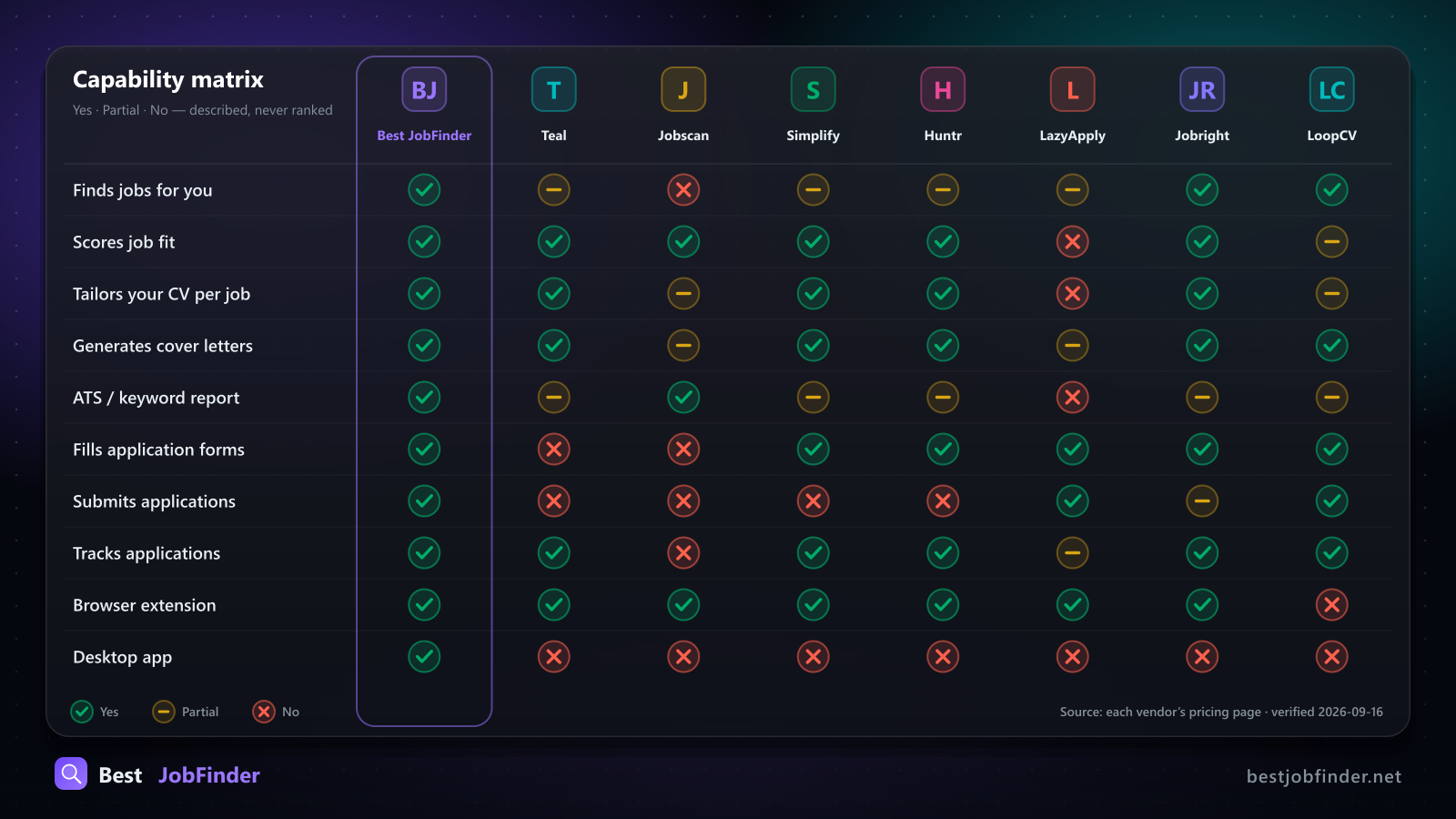
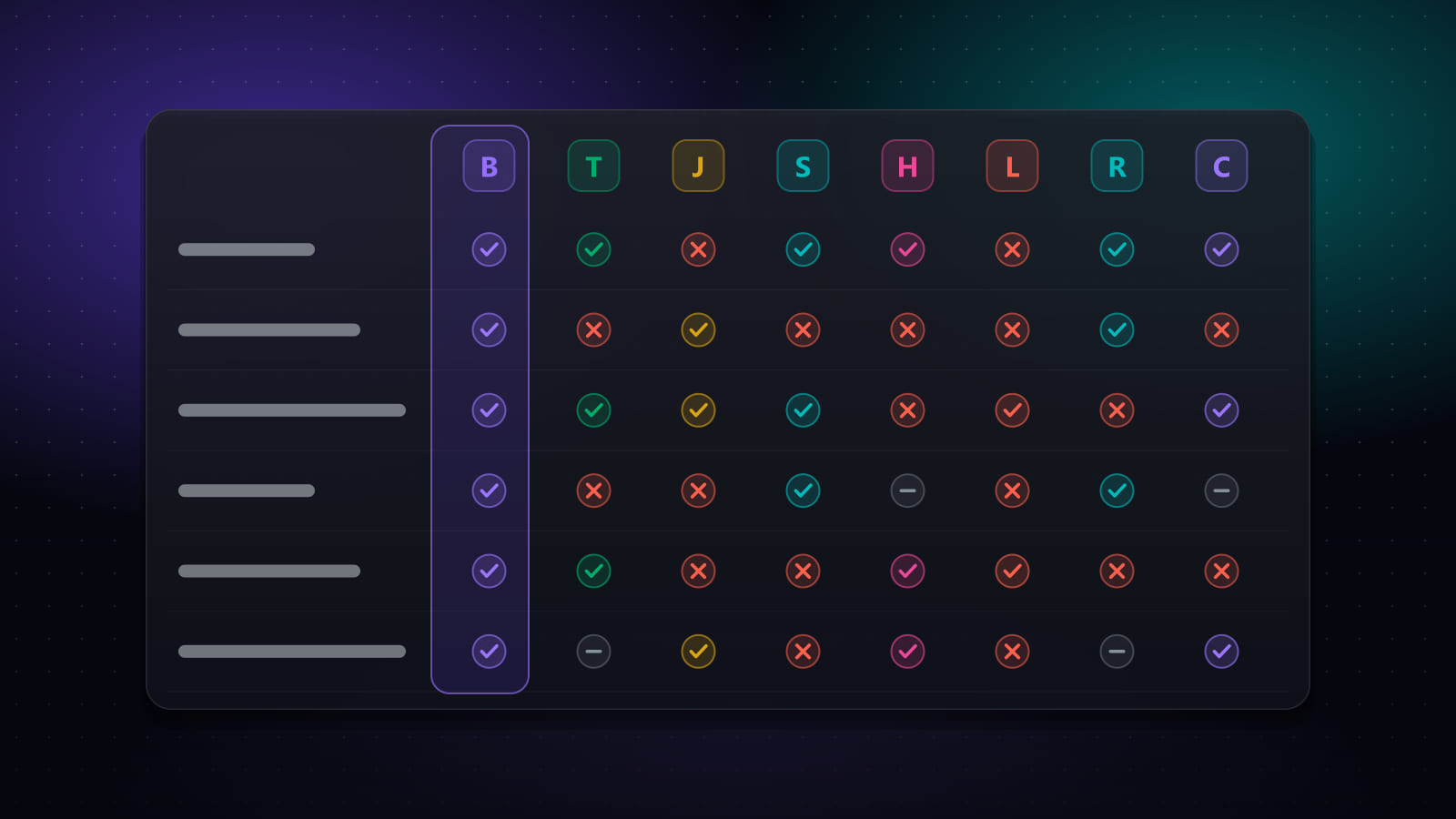
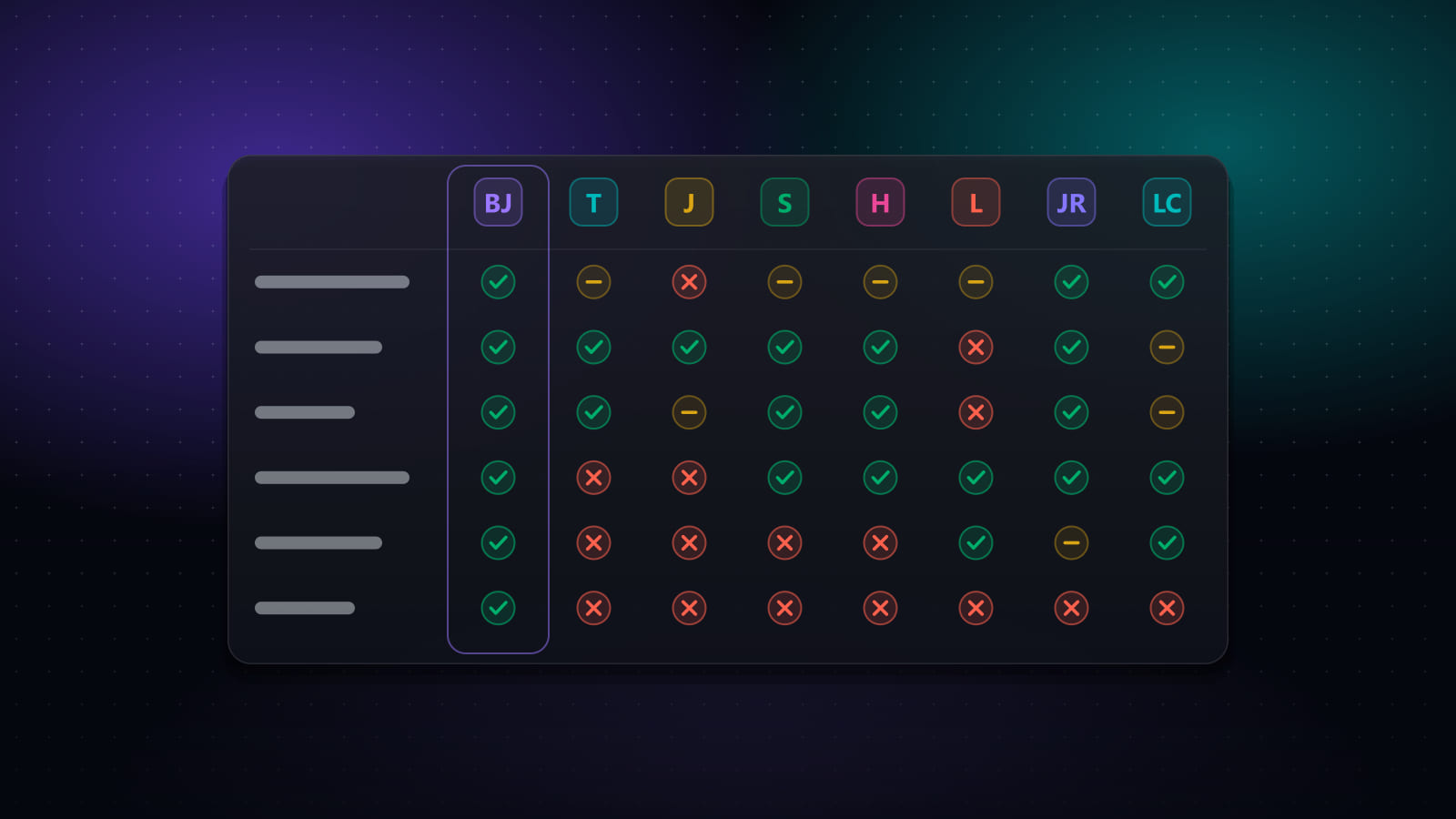
That table is the whole post. Everything below it is the fine print.
Disclosure first: I build Best JobFinder. So I set two rules for myself before writing a comparison that includes my own product:
- Every claim about another tool must be checkable on that vendor's own pricing or product page. Where I could not confirm a figure, the text says "reported", not a number presented as exact.
- Describe capabilities, never rank. "Does not submit applications" is a fact you can verify in five minutes. "Worse than us" is marketing, and you would be right to close the tab.
The pricing figures were last checked on 2026-09-16. If a vendor changed something since, the vendor is right and this post is stale.
The ten capabilities, and what each column means
The rows are the stages of a job search that software can plausibly take over:
| Capability | What "Yes" means |
|---|---|
| Finds jobs for you | Aggregates postings itself, instead of reacting to a page you already opened |
| Scores job fit | Compares a posting against your background and gives you a number |
| Tailors your CV per job | Rewrites the CV for one specific posting |
| Generates cover letters | For one specific posting |
| ATS / keyword report | A dedicated gap report, not just a score |
| Fills application forms | Types your stored answers into the form |
| Submits applications | Presses Submit for you. Most tools deliberately stop one step before this |
| Tracks applications | A pipeline or kanban with statuses |
| Browser extension | Exists |
| Desktop app | Runs as a native app, not only in a tab |
"Partial" is a real third state, not a polite "No". Teal's extension saves a posting you are looking at, which is discovery in the loosest sense, so that cell is Partial rather than No.
What each tool actually is
Teal is a job tracker and AI-assisted resume builder with a Chrome extension that saves postings you find yourself. It does not fill forms and does not submit. Its free tracker is the part reviewers rate highest; the paid tier is mainly unlimited AI credits. Teal+ is reported at $13/week, $29/month or $79/quarter, with no annual plan.
Jobscan is a resume-versus-job-description scanner. It produces a match rate plus keyword, skills and formatting gaps for one resume against one posting at a time. It finds no jobs and submits nothing, and its ATS report is the most detailed standalone diagnostic of the eight. Free tier: 5 scans a month, no expiry. Paid: reported around $49.95/month or $89.95/quarter.
Simplify is a browser extension that autofills application forms from a saved profile, with a tracker and job matching. Despite agent-style marketing language it is autofill only: you review and press Submit on every application yourself. Its ATS coverage is broad, and the free tier already covers the core autofill use case. Simplify+ is reported at $19.99/week, $39.99/month or $89.99/quarter.
Huntr is a kanban tracker with an AI resume builder, a job clipper and application autofill. It does not submit. The free tier is genuinely usable: up to 100 tracked jobs, 2 tailored resumes, unlimited autofills. Pro is $40/month, $30/month billed quarterly, or $26.66/month billed biannually. Those figures are on Huntr's own pricing page.
LazyApply is a bulk auto-apply extension for the major boards. It does submit, and it does so at volume, with reported daily caps from roughly 15 to 1,500 applications. It does not score a job against your background before applying, and it does not tailor. No free tier reported; annual plans reported from about $99 to $999.
Jobright is an AI matcher with an assistant, resume tailoring and something nobody else in this list has: surfacing insider and referral contacts at the company. Autofill exists; hands-off submission is partial. Freemium with limits; the paid tier is reported around $29/month. Its packaging has changed several times, so confirm current tier names.
LoopCV runs saved searches server-side and can send applications plus follow-up emails, which is also a capability none of the others offer. It is priced in euros, from about €9.99/month up to roughly €89.99/month, with a free-forever tier capped per day. Because it runs on its servers from your criteria, you see less of each individual application before it goes out. No browser extension.
Best JobFinder is the end-to-end pipeline: discovery across 20+ boards, a match score, CV and cover-letter tailoring, form filling, optional auto-submit, and tracking. It runs as a desktop app, a web app and a browser extension. Free access is a 7-day trial (20 job searches, 50 new jobs and 10 auto-apply runs per day), not a permanent free tier. Standard is $14.90/month ($9.90/month billed annually); Premium is $29.90/month ($19.90/month billed annually).
Pricing side by side
| Tool | Free | Paid (as published or reported) |
|---|---|---|
| Best JobFinder | 7-day trial | $14.90/mo or $9.90/mo annual · Premium $29.90/mo or $19.90/mo annual |
| Teal | Yes, metered AI | reported $29/mo, $13/wk, $79/quarter |
| Jobscan | 5 scans/mo | reported ~$49.95/mo, $89.95/quarter |
| Simplify | Yes, autofill included | reported $39.99/mo, $19.99/wk, $89.99/quarter |
| Huntr | Yes, 100 jobs | $40/mo, $30/mo quarterly, $26.66/mo biannual |
| LazyApply | None reported | reported $99 to $999/year |
| Jobright | Freemium | reported ~$29/mo |
| LoopCV | Free-forever, capped | from ~€9.99/mo |
Where the other seven are stronger
This section is the one I would skip if I were writing marketing, so it stays.
- Jobscan's gap report is deeper than ours. If one specific resume keeps failing one specific posting and you want to know exactly why, Jobscan was built for that question and nothing else.
- Simplify's and Huntr's free tiers are usable forever. If you want autofill and a tracker at $0 and you are fine pressing Submit yourself, you do not need a trial.
- Jobright finds you a human. Surfacing a referral path at the company is a different lever from automation, and it is one we do not pull.
- LoopCV sends follow-up emails. Automated follow-ups after an application are not something we do.
- LazyApply will out-volume everyone. If raw application count is the only metric, nothing here matches 1,500 a day. I think that is the wrong metric, and the next section says why, but it is a real difference.
Where Best JobFinder is different
The matrix shows it as the only column with ten "Yes" cells. The reason is not that we out-built seven teams on each feature. It is that we started from the opposite end: one pipeline, with a human allowed to intervene at any point, instead of one feature done very well.
Three design decisions follow from that:
- Auto-submit is a per-run setting, with a pause button. A run can submit above a match threshold you set, route a middle band to review, and skip the rest. While it runs you can pause, edit any field it filled, skip a job, or stop. Nothing leaves without having been reviewable, either per job or live during the run. I wrote up the thresholds in a separate post on supervised auto-apply.
- The automation runs in a real browser on your machine, as you. No job-board passwords are stored anywhere. The desktop app and the extension reuse the session you already signed in to, and pace every click with randomised human-like delays. That is also why the desktop app can do things a web-only tool cannot: it drives an actual browser window.
- The score is a formula, not an opinion. The match percentage is
[Σ(competency% × weight) − 30 × missing] ÷ 10, with exact, case-insensitive skill matching. Same job, same skills, same number, every time, on every screen. There is a postmortem on why that matters.
Which one, for which search
- You want a free tracker and a resume builder, and you apply by hand: Teal or Huntr.
- One resume keeps dying at one company's screen: Jobscan.
- You want to stop typing your address into Workday but keep your finger on Submit: Simplify.
- You want a referral path into the company: Jobright.
- You want hands-off campaigns with follow-up emails, and you accept seeing less of each application: LoopCV.
- You want maximum volume and no tailoring: LazyApply, with your eyes open about account rate-limiting.
- You want the whole pipeline in one place, with a human-in-the-loop pause available on every automated run: Best JobFinder.
How this table stays honest
A small engineering note. Our landing page has five pages that compare the same products. If each page restated prices in prose, they would drift apart within one pricing cycle and the site would contradict itself. So every competitor fact lives in one TypeScript array, with a sources URL per tool and a single PRICING_VERIFIED_ON constant that every page renders. The comparison you just read is a rendering of that array. If you find a cell that is wrong, tell me and I will fix the array, which fixes every page at once.
Try it: bestjobfinder.net. The trial is seven days.
Ready to automate your job search?
Best JobFinder combines job discovery, AI skill matching, resume tailoring, and configurable auto-submit in one platform — with a 7-day free trial.
Try Best JobFinder free →