AI Resume & Cover Letter Templates: How Tailored Applications Get You More Interviews
A resume tailored to the job description is 1.6x more effective than a generic one — raising response rates from roughly 3.7% to 5.8%. Cover letters follow the same pattern: recruiters can tell within seconds whether one was written for the role in front of them or copy-pasted from a template.
The problem is time. Rewriting your resume and cover letter by hand for every application isn't realistic when you're applying to dozens of roles a week. That's what AI resume and cover letter generation is for — and it's a lot more useful when the output doesn't look like it came out of a generator.
Why "One Resume Fits All" Doesn't Work Anymore
Two filters stand between your resume and a human recruiter:
- The ATS keyword filter. Most companies run resumes through an applicant tracking system before anyone reads them. If your resume doesn't contain the specific terms from the job description — the exact tech stack, certifications, or phrasing the posting uses — it can get filtered out before a human ever sees it.
- The six-second skim. Recruiters who make it past the ATS spend an average of six to eight seconds on a first pass. A resume that leads with irrelevant experience, or buries the one bullet point that matches the role, doesn't survive that skim — even if the candidate is qualified.
A single generic resume can't optimize for both filters across different roles at the same time. A backend-heavy resume undersells you for a full-stack posting; a resume front-loaded with leadership bullets buries the hands-on technical experience a senior IC role is screening for. Tailoring per job fixes both problems — the question is how to do it without spending an hour per application.
How AI Resume Tailoring Actually Works
Best JobFinder's resume and cover letter generation runs on the same profile data you already use for auto-apply — no separate setup:
Step 1: Your Profile
Your CV profile — work history, skills, education, projects, certifications — is the source material. This is the same profile the auto-apply engine pulls from to fill application forms, so there's nothing extra to maintain.
Step 2: The Job Description
When you generate a tailored resume or cover letter for a specific job (or let auto-apply do it automatically during a run), the AI reads the job description alongside your profile — the required skills, the seniority signals, the specific tools and frameworks named in the posting.
Step 3: AI-Generated, Job-Specific Content
The AI rewrites your summary and reorders/reweights your experience bullets to emphasize what this specific job is asking for — using your real experience, not invented claims. Skills and projects that match the posting move up; less relevant ones move down or get trimmed. The result reads like you wrote it for this job, because in a meaningful sense you did.
Step 4: Choose a Template
Once the content is generated, pick a visual template. The template controls layout and design only — your tailored content carries over unchanged, so you can preview the same resume in a traditional serif layout or a modern dark-mode design without regenerating anything.
Five Templates, Five Use Cases
Different roles and industries respond to different resume styles. Best JobFinder ships five templates covering the range you'll actually need:
- Executive — a navy sidebar with gold accents and a photo badge. Built for leadership and senior IC roles where a more traditional, polished look reads as credibility.
- Modern — a card-based layout with a teal gradient header. Clean and scannable — a safe, strong default for most tech and business roles.
- Minimal — a two-column layout with a soft blue accent and a quote-style summary. Understated, and easy for a recruiter to skim in the six-second window.
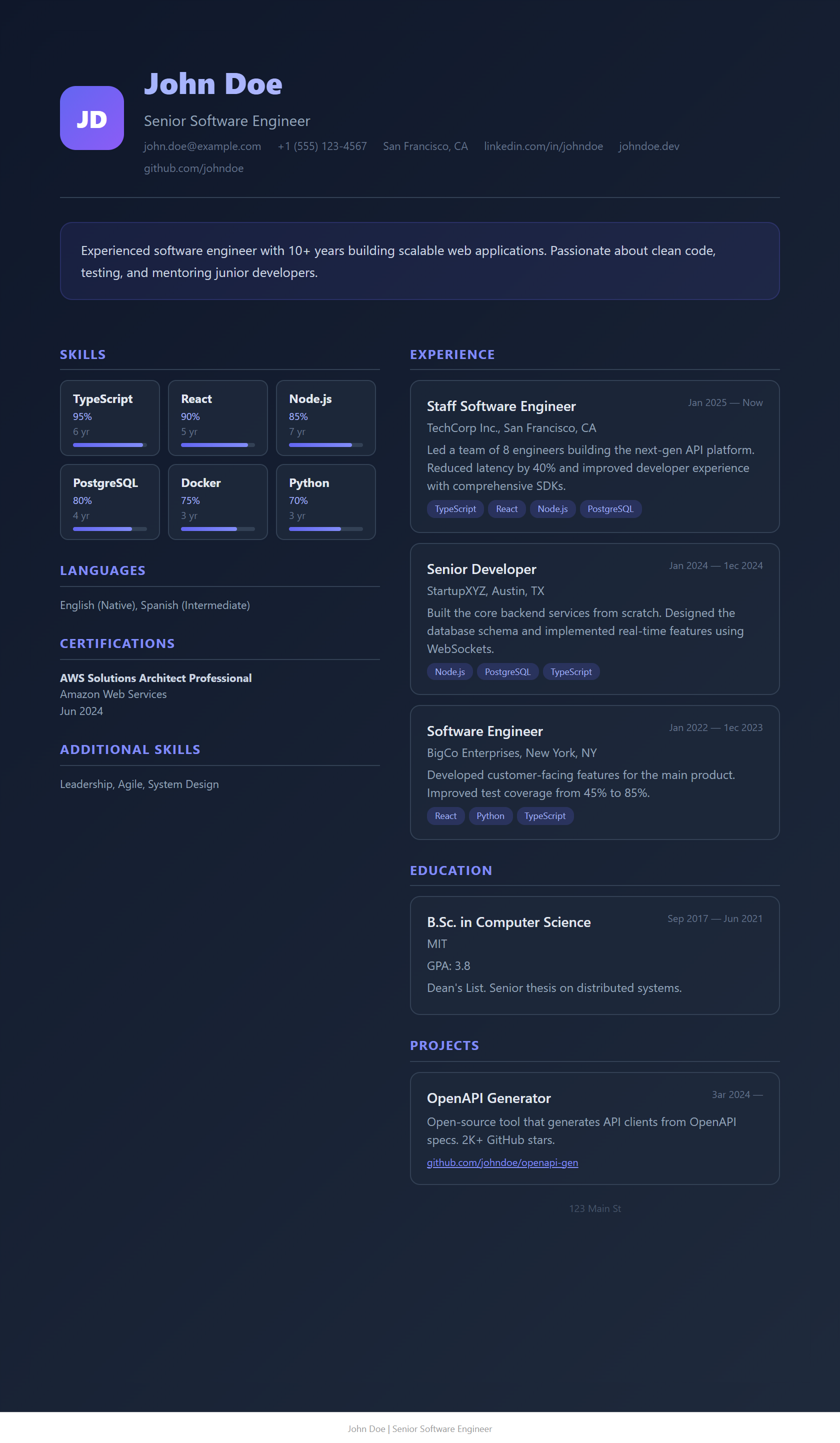
- Midnight — a dark-mode design with violet highlights. A bold pick for design, product, and startup roles where a more distinctive resume is an asset rather than a risk.
- Classic — a traditional serif layout in a single column. The safest choice when you're not sure how a company's ATS will parse a more visually complex layout, or for conservative industries (legal, finance, academia).
When in doubt: Classic or Modern are the safest defaults for ATS parsing. Save Executive and Midnight for roles/industries where a more distinctive design is genuinely an asset — and always check a role's stated resume requirements ("PDF only," "no graphics") before picking a more visual template.
Cover Letters Work the Same Way
Cover letter generation follows the identical pattern: your profile plus the job description in, a job-specific draft out. The same rule applies as for resumes — a cover letter that references the actual company and role outperforms a generic "To Whom It May Concern" template every time, and it takes the AI seconds instead of costing you the twenty minutes most people spend staring at a blank page per application.
During an auto-apply run, if a job's application form has a resume or cover letter upload field and tailored generation is turned on, both get generated and attached automatically — the run waits for generation to finish before submitting, so you never end up with a submitted application missing its cover letter.
Common Mistakes When Tailoring Resumes with AI
- Letting AI invent experience. Good tailoring reorders and reweights what's true — it should never fabricate a skill or project you don't actually have. Always review a generated resume before it goes out, at least for the first few applications.
- Ignoring the template's format requirements. Some ATS platforms still struggle with multi-column or heavily styled layouts. If a posting doesn't specify, Classic or Modern are the safer bet.
- Regenerating instead of reviewing. If a generated summary doesn't sound like you, edit it — don't just regenerate hoping for a better draft. Small edits keep the voice consistent across your whole application.
- Using one template for every application. The template should match the role and industry, not just your personal taste. A Midnight-themed resume for a compliance role at a bank sends the wrong signal before anyone reads a word of it.
Related: How to auto-apply to jobs, step by step → · Best AI job search tools for 2026 → · Fix job application burnout →
Ready to automate your job search?
Best JobFinder combines job discovery, AI skill matching, resume tailoring, and configurable auto-submit in one platform — with a free tier available.
Try Best JobFinder free →